Start with the visitor’s experience
A useful speed review asks when important information appears, whether the menu responds and whether a form can be completed. A Lighthouse score helps direct the investigation, but does not explain every delay.
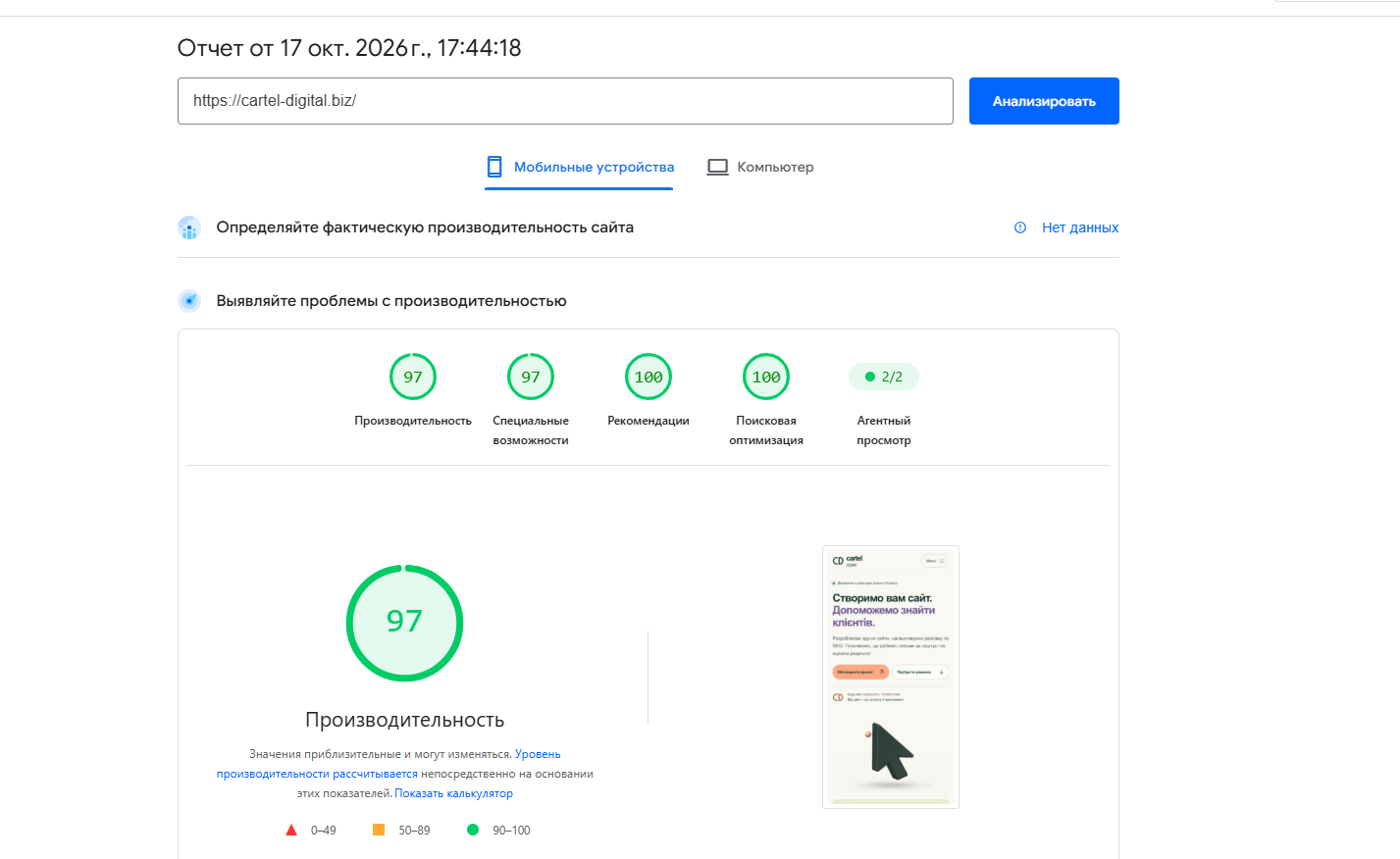
This article examines a mobile report for cartel-digital.biz dated 17 October 2026. The screenshots specify Moto G Power emulation, slow 4G and Lighthouse 13.5.0. It is a historical diagnosis, not the website’s current score or a before-and-after comparison.

Run a comparable check on your website
- Open PageSpeed Insights and enter the complete HTTPS page address.
- Run the mobile test and assess desktop separately.
- Review the real-user experience section and the laboratory diagnostics below it.
- Save the date, mode, report link and specific findings.
- Repeat for a service page, article, category and product where relevant.
Understand LCP, INP and CLS
LCP measures when the largest visible content element appears; a good threshold is at most 2.5 seconds. INP assesses responsiveness to interactions; a good threshold is at most 200 milliseconds. CLS measures unexpected layout shifts; a good threshold is at most 0.1.
Field assessment uses the 75th percentile and distinguishes mobile from desktop. Laboratory TBT helps identify JavaScript blocking, but is not a substitute for INP.
PageSpeed uses CrUX observations from the preceding 28 days. If there are too few eligible observations, the field section may show no data. That does not prove poor speed or no visitors. One laboratory run cannot establish that field Core Web Vitals pass.
What the saved report actually shows
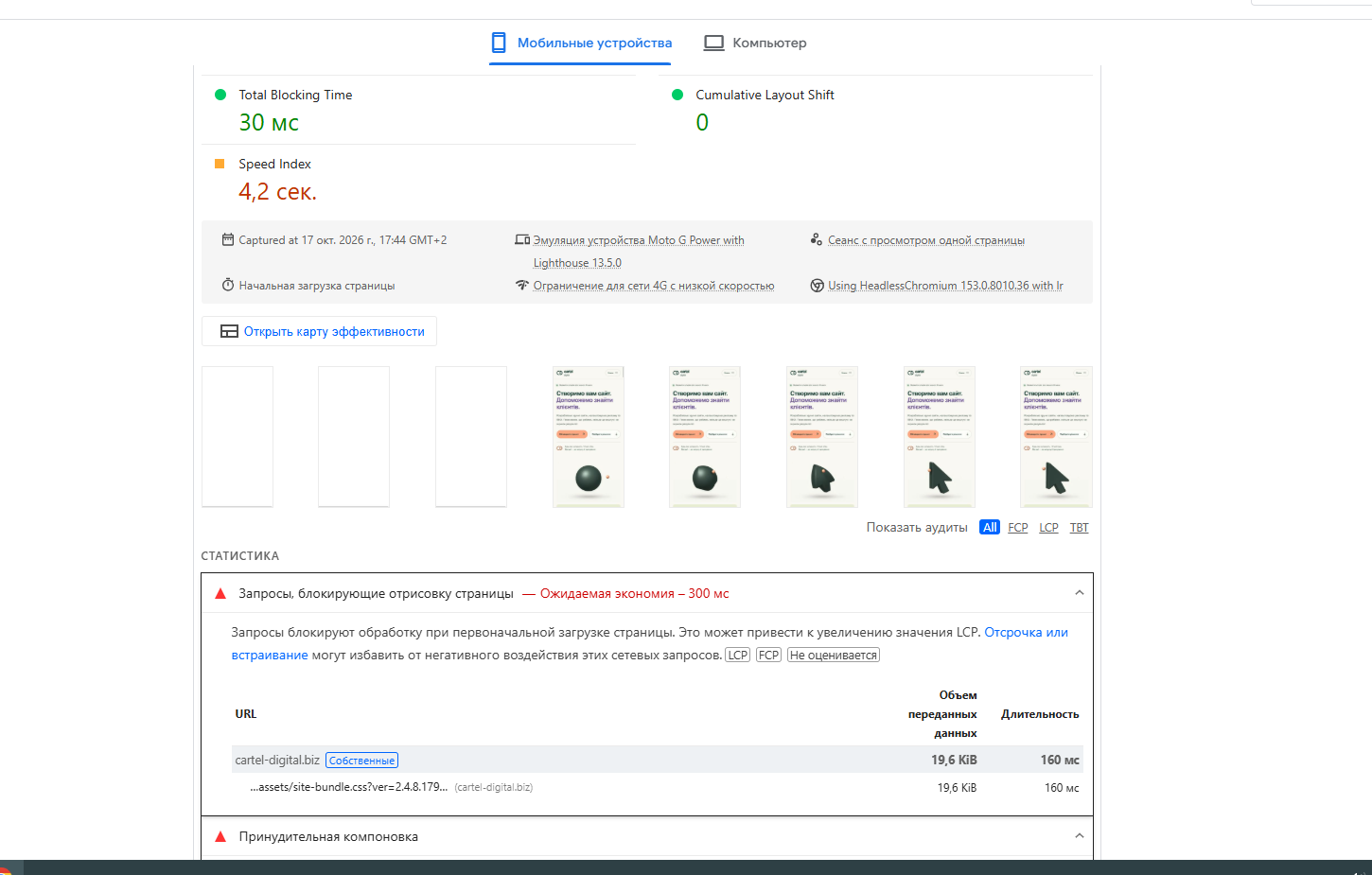
In this run, performance and accessibility scored 97 out of 100. Best Practices and SEO scored 100 out of 100. TBT was 30 ms, CLS was 0, and Speed Index was 4.2 seconds. These values describe the saved test.
Speed Index is neither LCP nor total load time. The supplied screenshots do not display LCP or FCP values, so those metrics cannot be assessed from the images. The SEO score covers a limited set of technical checks; it does not predict search positions.
Investigate the main image’s priority
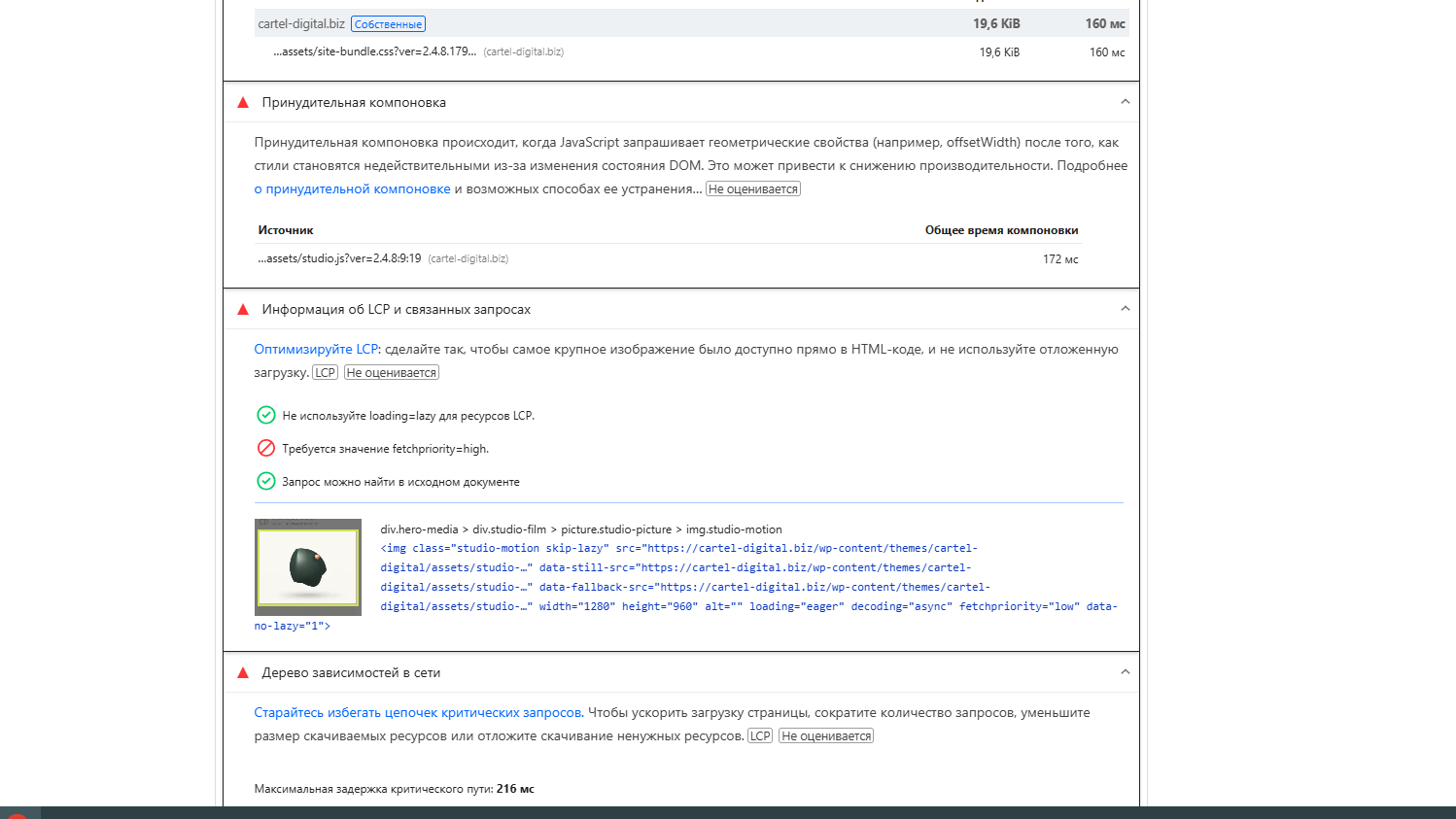
The report highlights the first-screen animation image. It appears in the source HTML and is not lazy-loaded, but has fetchpriority="low". For an image confirmed as the LCP element, a higher priority is a hypothesis worth testing.
Do not assign high priority to every image. Identify the LCP element in the relevant device mode, then check file size, discovery and whether lazy loading delays it. Change one factor and compare repeated runs under similar conditions.
For oversized files, review image dimensions, formats and alt text. Renaming a JPG file to WebP does not convert or compress it.
Review layout work and CSS
The report attributes 172 ms of forced layout to studio.js. Calling getBoundingClientRect() is not inherently an error. Timing and frequency matter, especially when style changes alternate with geometry reads.
The developer should check whether the measurement is needed immediately and whether IntersectionObserver can handle visibility. Animation start and stop behaviour must still work after the change. The 172 ms cannot simply be added to TBT or treated as guaranteed time saved.
The CSS finding estimated 300 ms of potential savings and listed a 19.6 KiB stylesheet. This is an estimate for that run. Review unused rules and first-screen requirements before deferring styles; delaying every stylesheet can leave visitors with an unstyled page.
Check caching and readability separately
The screenshot shows a seven-day cache lifetime for images and CSS, with no lifetime specified for two JavaScript files. Estimated savings are about 30 KiB. Inspect those particular response headers; the finding does not show that caching is disabled across the whole website.
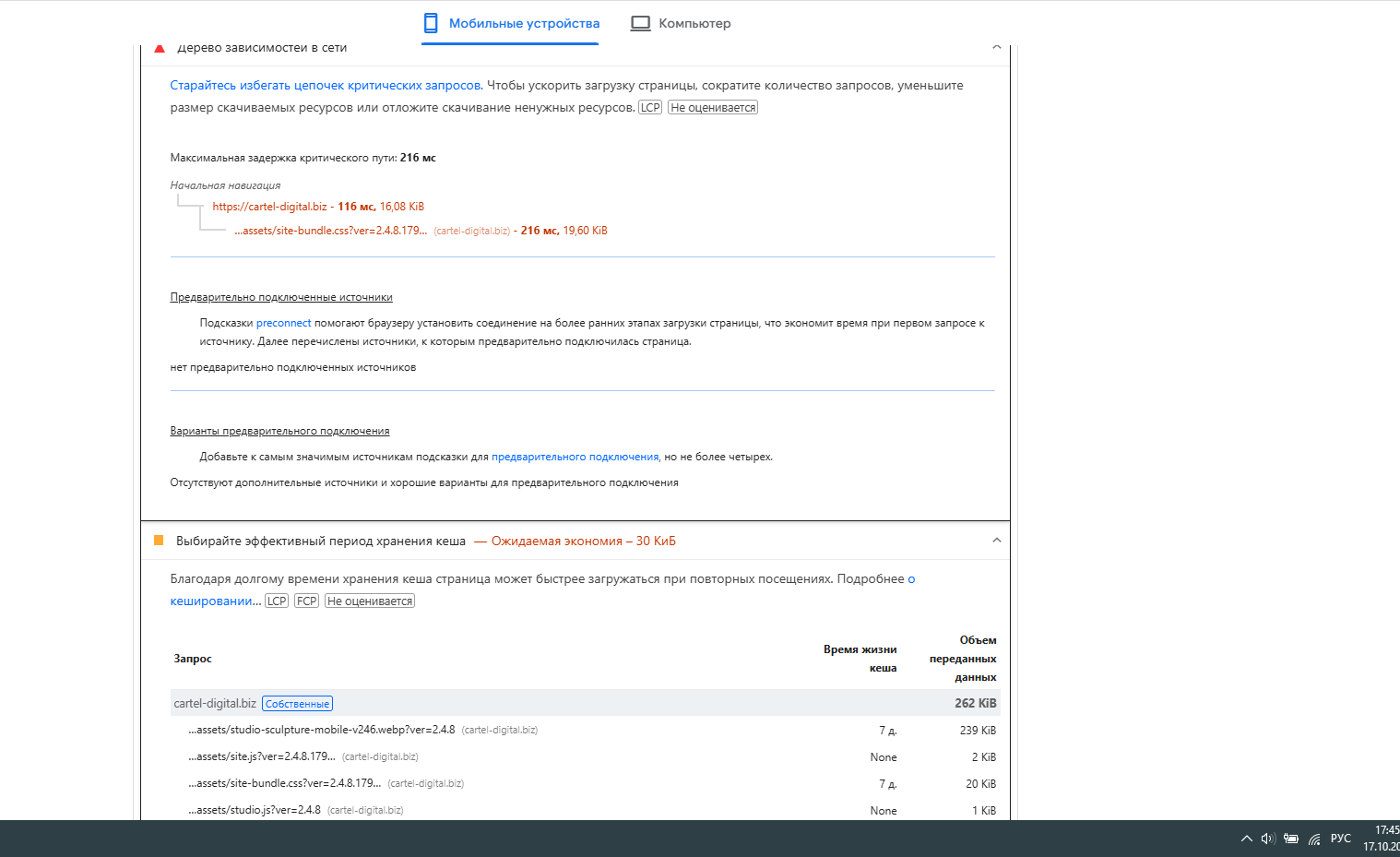
Unchanging static files may suit a longer cache lifetime with versioned URLs after updates. HTML, forms and personalised pages need separate policies. WordPress page caching and browser caching of assets are distinct layers.
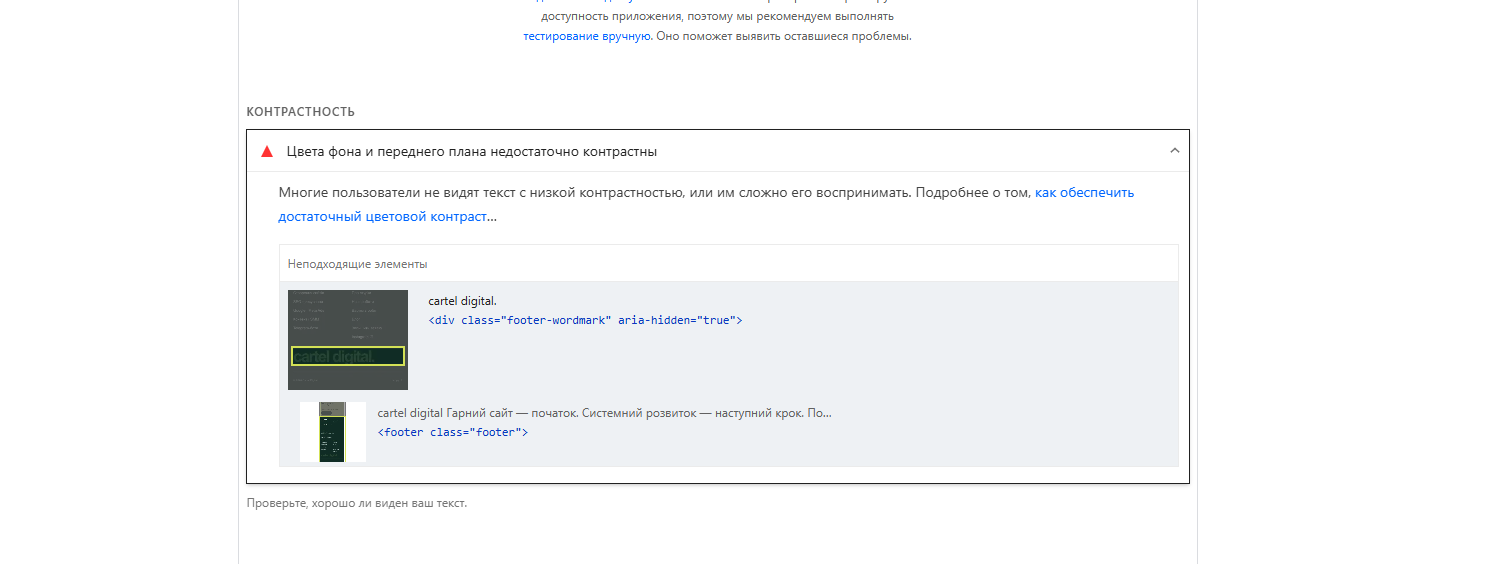
The accessibility finding concerns the large “cartel digital.” text in the footer. Check readability and increase contrast where necessary. This is an accessibility task, not a speed metric.
Verify the implementation
Save the original report and a recoverable copy before changing code. Record the change, clear the relevant cache and repeat the same URL in the same mode. Comparing the median of three runs is a practical method, not a Google requirement.
Manually check navigation, links, the form, enquiry confirmation and animation after scrolling or returning to the tab. Test a representative internal page too. Field data reflects its reporting period and does not update immediately after deployment.
Write an actionable development task
A useful task names the URL, observation, hypothesis and verification method. For example: “The mobile report dated 17 October identifies a low-priority LCP image on the home page. Test high priority, repeat three measurements and confirm that the image, buttons and animation still work.”
“Get 100 points” does not identify the experience to improve. Record an unsuccessful hypothesis and investigate the other components of the delay instead of claiming a result.
Common questions
Should every page score 100?
Not at any cost. A high score can still contain specific opportunities. Judge further optimisation by visitor benefit, implementation effort and the functions that must remain available.
Will a higher score guarantee better rankings?
No. Core Web Vitals are used by search systems, but technical performance does not replace relevance, useful content or other signals. This report cannot predict a particular change in rankings.
Is replacing the SEO plugin enough?
A plugin change does not itself correct image priority or the logic in studio.js. Select tools for a verified requirement.
Include speed in a wider SEO audit when several issues are involved. Assess search queries and indexing separately in Google Search Console.
The five original report screenshots dated 17 October 2026 retain their numerical values. Different areas of one screenshot support separate explanations; the original interface language is preserved.
Explore our services: Website creation, pricing or discuss your project.
Related articles
Website Images: Sizes, WebP and Alt Text
Choose image dimensions and formats, write useful alt text and preserve the details readers need.
Read the article
WordPress Backups: What to Save and How to Restore
Know what to back up, where to keep it and how to test WordPress recovery before an outage.
Read the article