Website Development for Real Estate Agencies
Property buyers arrive with criteria such as location, budget, floor area and room count. They need to compare relevant listings and know whether they remain available. We build catalogues with useful property details and viewing enquiries routed to the right agent, based on your sales, rental and listing-management process.
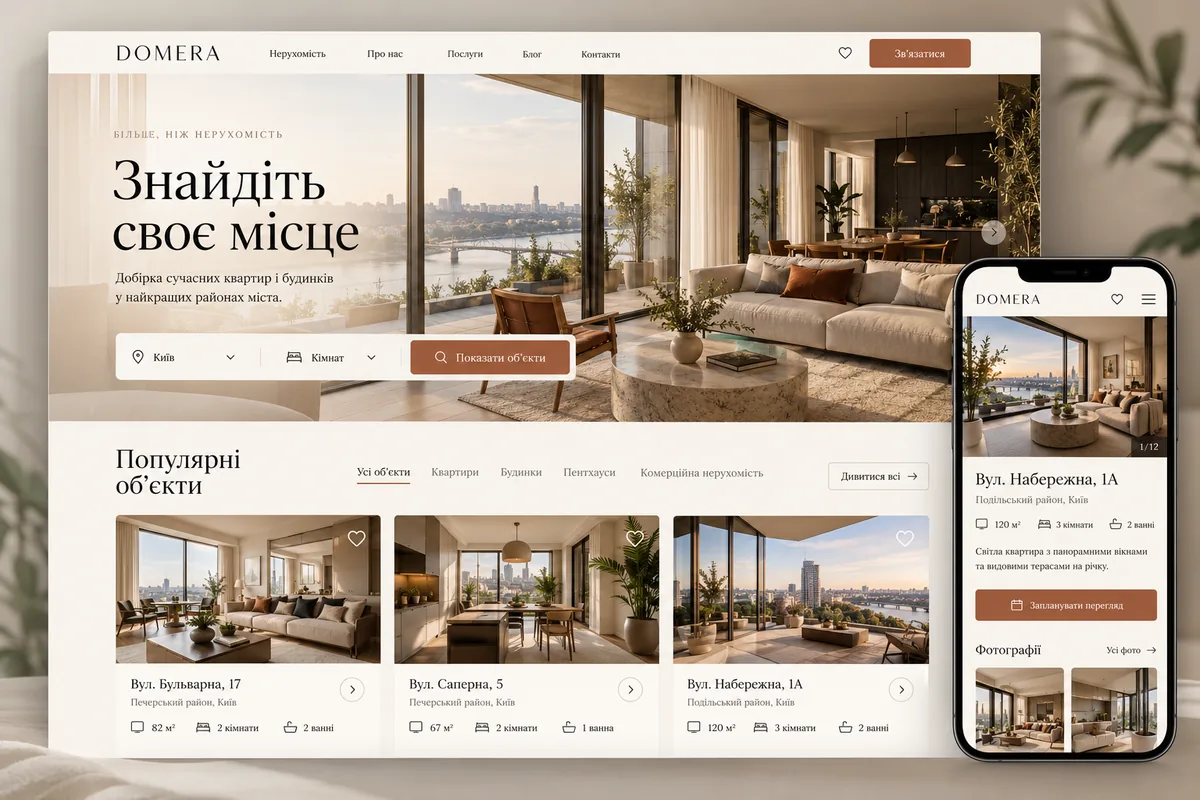
- 01
Search by the criteria that matter
A person selects objects according to parameters important for your database, sees the result and can change the conditions without refilling the entire search.
- 02
Up-to-date property availability
Statuses "available", "reserved" and "withdrawn from the offer" are updated according to agreed rules. The manager receives an enquiry along with the card number and address.
- 03
Enquiries with the right context
The form identifies the property, preferred contact method and requested time. An agent confirms the viewing unless a synchronised calendar provides actual availability.
Let’s start with how the buyer chooses an apartment.
The catalogue of sales of apartments and the catalogue of commercial rent should not have the same set of fields. In the first important rooms, floor, repair condition and house; in the second - the purpose of the room, power, access and rental conditions. Together, we determine the mandatory parameters for each type. On the phone, we leave the most necessary filters next to the results, and the additional ones are lost separately. If nothing is found, we explain what restrictions.
Which pages an agency needs beyond the homepage
The structure is built around three audiences: buyers, tenants and owners. The offer to sell an apartment through the agency has a different meaning than the list of apartments for the buyer. We separately show the team, rules of cooperation and real ways of communication. We add sections of districts when there are actual objects and a useful local context. Hundreds of empty combinations of “city + type + district”.
| Page | What the visitor sees | Next Action |
|---|---|---|
| Sales catalogue | Available objects, price, area, area, filters | Open a suitable apartment |
| Object Card | Photo, planning, characteristics, status, conditions | Request a viewing |
| For owners | Sales process, service composition, order of communication | Discuss your object |
| Agents | Specialization, area of work, verified contacts | Contact the person in charge |
| Area or direction | Current property listings and local information | Narrow the selection |
- CatalogueSale and rental with different search terms
- Direction or areaA selection of current offers
- ObjectPhoto, planning, price and status
- Request to viewObject and contact are transmitted to the agent
- For the ownerA separate flow for selling or letting
- Team and contactsResponsible agents and working conditions
Property details that lead to informed enquiries
The property page opens with the price, floor area, room count and availability. Photos open in an easy-to-use gallery, and the floor plan is readable on a phone. We explain what the price includes, how commission is shown and which terms need confirmation. We agree the map’s level of detail with the agency and owner; sometimes the district is sufficient. The contact button remains accessible after browsing photos. Sold listings show an accurate status and relevant available alternatives rather than an outdated offer.
How to avoid different prices on the site and in CRM
Before integration, agree the source of truth for prices, descriptions and availability. Stable property identifiers prevent duplicate listings. Define synchronisation frequency and failure handling: retain valid data and notify the responsible person when the connection fails. Third-party listings require rights to use their photographs and descriptions.
| Situation | Rule of work | How we check |
|---|---|---|
| Changed price | Update the existing listing by ID | Comparing CRM and website data |
| Object removed | Change the status and availability of the enquiry | Check the catalogue and the page’s direct URL |
| Photo not loaded | Keep the product page without a broken gallery | Record the import error |
| The enquiry was received twice. | We mark the repetition, do not lose contact | Test re-pressing |
What the agency does and what we do
You need examples of cards, database structure, rules for showing prices, terms of cooperation and reliable materials about the team. It is better to start with several fully filled objects than to import a thousand ads with omissions. We design templates, show a search prototype, set up controls and help to arrange the feed. Real photos, confirmed facts and a clear description of the service work more convincingly than the employee.
What determines the cost of the catalogue
The main volume is determined not by the number of pages in the menu, but by the logic of the data. Manual catalogue of one city is simpler than a portal with several CRMs, currencies, languages and individual agent offices. At the start we can focus on the catalogue, quality card and transfer enquiries. Selected, comparison, subscriptions to new objects and complex cards can be added to the cost, we divide the service.
What to check before opening the catalogue
We test mobile search through to a received enquiry, including no results, invalid filters, sold listings, slow images and form errors. Existing URLs belong in the migration plan. Analytics distinguishes listing views, contact clicks and successful enquiries; the agency separately assesses enquiry quality.
Frequently asked questions
Can I transfer objects from the old site?
Yes, if you have access to the export or data structure. First check the fields, photos, duplicates and statuses on the sample. We plan to transfer addresses separately so that valuable pages do not disappear without an appropriate replacement.
Does the buyer need an account?
A first release often needs browsing without registration and an easy contact route. Accounts can support saved searches, shared shortlists or history when those features are needed. Do not add unnecessary steps to arranging a viewing.
How to show objects that have already been sold?
Decide based on the listing’s continuing value. It may remain with an accurate unavailable status and relevant alternatives, or leave the catalogue. Do not silently replace it with an unrelated property.
Does the site itself confirm the viewing time?
Only if a current calendar is connected and the agent’s and property’s availability rules are agreed. Otherwise, the form collects a preferred time and the manager confirms it. The interface makes this distinction clear.
Will the catalogue be ready for SEO?
In the development, we agree on pages, metadata, speed and internal links available for search. Further SEO is a separate work with demand, content and results. The presence of filters does not create useful landing pages by itself.
Prepared by the Cartel Digital team. The examples illustrate possible solutions; we agree the scope around your business needs.
Show us how your property listings are managed
Send the address of the existing site or directory example, CRM name, real estate types and main region. We will discuss the structure, update rules and functions of the first launch.