Website Development for Restaurants
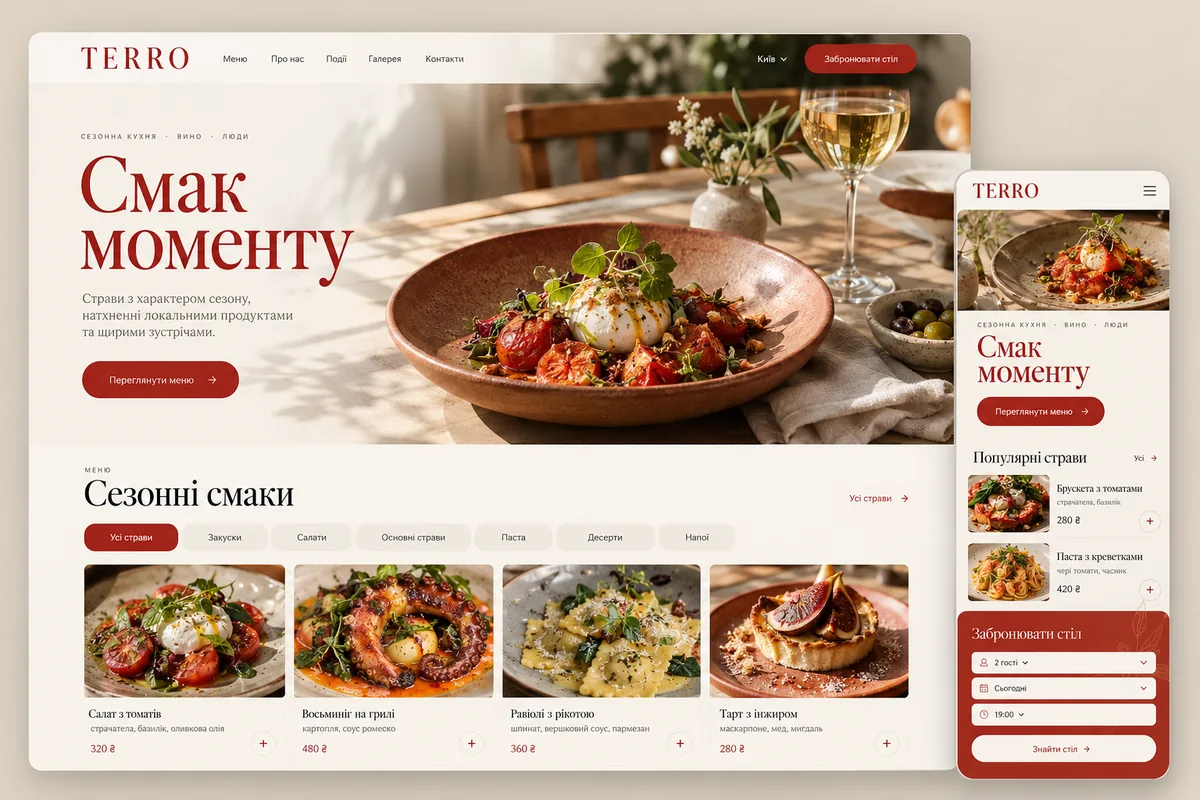
The guest can fall in love with your interior with the delivery of a photo, but before the visit, he will want to see the menu, prices, address and availability of the table. The restaurant site should help you do this in a few understandable steps even from the phone by road. We develop sites for restaurants, cafes, bars and small institutions: with a readable menu, event pages and a separate way of booking. We show the nature of the kitchen and the atmosphere in one place.
- 01
The menu is easy to read
Categories, names, composition, output and current prices are available without downloading a heavy document. A person can go directly to the desired section.
- 02
Visits are easy to plan
We show the address, schedule, features of the halls and the method of booking. For a large company, we provide a separate understandable request with the necessary details.
- 03
The venue is easy to recognize
We collect photos, text intonation and design around your kitchen. The site conveys the atmosphere without hiding the decorative effects of menus and contacts.
Different guests need different answers
The one who is looking for a place for lunch, compares the menu and the time of the road. For a birthday important capacity, deposit, organization and contact of the responsible manager. For a first date — the atmosphere and the opportunity to choose a quiet table. We bring these scenarios in understandable sections, if the venue really serves them. General “we have everything for your holiday” replace specific conditions.
| Conversation flow | The right section | Key information |
|---|---|---|
| Dinner today. | Menu and contact details | Cuisine, prices, opening hours and address |
| Book a table | Booking | Date, time, number of guests, confirmation method |
| Organise event | Banquets or events | Halls, capacity, conditions and manager |
| Visit with a child | Venue information and answers to common questions | Real comforts and limitations |
| Take food with you | Collection | Available menu and order order |
- HomeKitchen, atmosphere and reason to come
- MenuCategories of dishes and current prices
- About the venuePeople, interior and features
- EventsHalls and conditions for companies
- BookingRequest or choose the available time
- ContactAddress, schedule and route
Booking a table without false expectations
First, we establish whether tables are managed manually or by a booking system. A manual request form collects the date, time, party size and contact details, then explains that confirmation is pending. An automated system must account for visit duration, capacity, joined tables and restrictions. We choose the approach before designing the final screen because the complexity differs.
For a short-form banquet, it is often not enough: you can add the event format and the approximate number of guests, but do not convert the enquiry to a long questionnaire. We test situations when the venue is closed, the desired time is already occupied or the message is not delivered to the administrator. A person should see what happened and what the next step is, and not click the button several times.
Photos and copy that convey the venue’s character
For the restaurant, an integral story is important: kitchen, people, space and a reason to come. We choose our own photos of dishes and interior, show the location of tables and halls. The main one does not need all the pictures from the photo shoot: several good shots work better than a long-loading gallery. Photos should correspond to what the guest will see on the spot.
In the texts, we explain the nature of the kitchen through specifics: the method of cooking, special dishes, the format of the feed, the seasonal menu. If we talk about the chef, we use verified facts, not invented awards. The schedule of the kitchen, bar and venue may differ - this is clearly shown. For a seasonal terrace, we clarify the working conditions so that a beautiful banner does not create an incorrect expectation.
What we launch immediately, and what should be taken to the next stage
For many institutions, the first quality start-up is the main one, menus, contacts, event page and a working way to book. Other functions are added after assessing the benefits and costs of support. For example, the loyalty program needs rules, accounting and a responsible employee, not just buttons on the site. We divide up the one-time development, filling and payment of external services.
| Function | When needed | What affects the budget |
|---|---|---|
| An editable menu | Prices and range change | Number of categories, fields and languages |
| Manual booking | An administrator confirms appointments | Form fields and message routes |
| Table Calendar | Automatic confirmation is required | System capabilities and integration |
| Multiple venues | Different addresses, menus or graphs | Individual pages and selection rules |
| Online Ordering | Is self-delivery or delivery | Cart, payment, zones and accounting of orders |
Check before launch and daily work
We test the site in a guest situation: we open the menu through the mobile Internet, find the price, build the route and send a request to the table. We check that the address and phone are correct in all places, messages reach, and photos do not overlap the text. If a QR code is used in the hall, it should lead to a stable menu address, which does not have to be changed after each update.
We pass the order of editing dishes, promotions and festive schedule. With the consent, we configure the measurement of menu views, enquiries and reservations, without calling every click a real guest. After launch, it is useful to check the administrator's questions: if people continue to clarify the same condition, it should be made more noticeable on the site.
Frequently asked questions
Is it possible to make one menu for the site and QR code on the tables?
Yes, QR-code can lead to the same convenient menu page. Prices and dishes are updated in the editor, and the address remains stable. If the menus in the hall and delivery are different, you need to clearly divide these options so that the guest sees the correct offer.
Do I have to take photos of each dish?
No. You can start with quality photos of key locations and interiors, with readable descriptions. It is important not to mix random stock photos with real dishes as if it were your own. The scope of the shooting is determined by the menu and budget.
We have several locations. Do we need separate websites?
Often it is enough to have one site with the choice of an venue and individual pages of addresses. Each one shows its menu, graph, photos and method of booking. If brands or processes differ significantly, we will discuss another structure. We do not consider the number of addresses as a reason to create separate sites.
Can I start without a booking system?
Yes, leave a call or request form. It is important that the administrator process the enquiry in time, and the site does not call an unconfirmed enquiry a booked table. Automation can be added later when the landing rules are determined and the appropriate service is selected.
Can I add delivery after launch?
Yes, if the menu and data structure are planned in advance. Delivery needs its own rules for dish availability, service areas, minimum orders, payments and statuses. It is a separate stage involving the entire order journey, not simply a “Buy” button.
Prepared by the Cartel Digital team. The examples illustrate possible solutions; we agree the scope around your business needs.
We will make a website that helps the guest to come to you
Send a menu, a few photos and tell us how the tables are now booked. We will determine the necessary sections, how to update and the functions of the first launch.