Website Development for Private Clinics
The patient comes to the site of the clinic with a specific question: is there a necessary specialist, where he accepts, how much does the consultation cost and how to register. It is difficult for him to navigate in a long list of medical terms and it is even more difficult to call to find out every detail. We create sites of private clinics that help find the right direction, get acquainted with the doctor and leave a clear request.
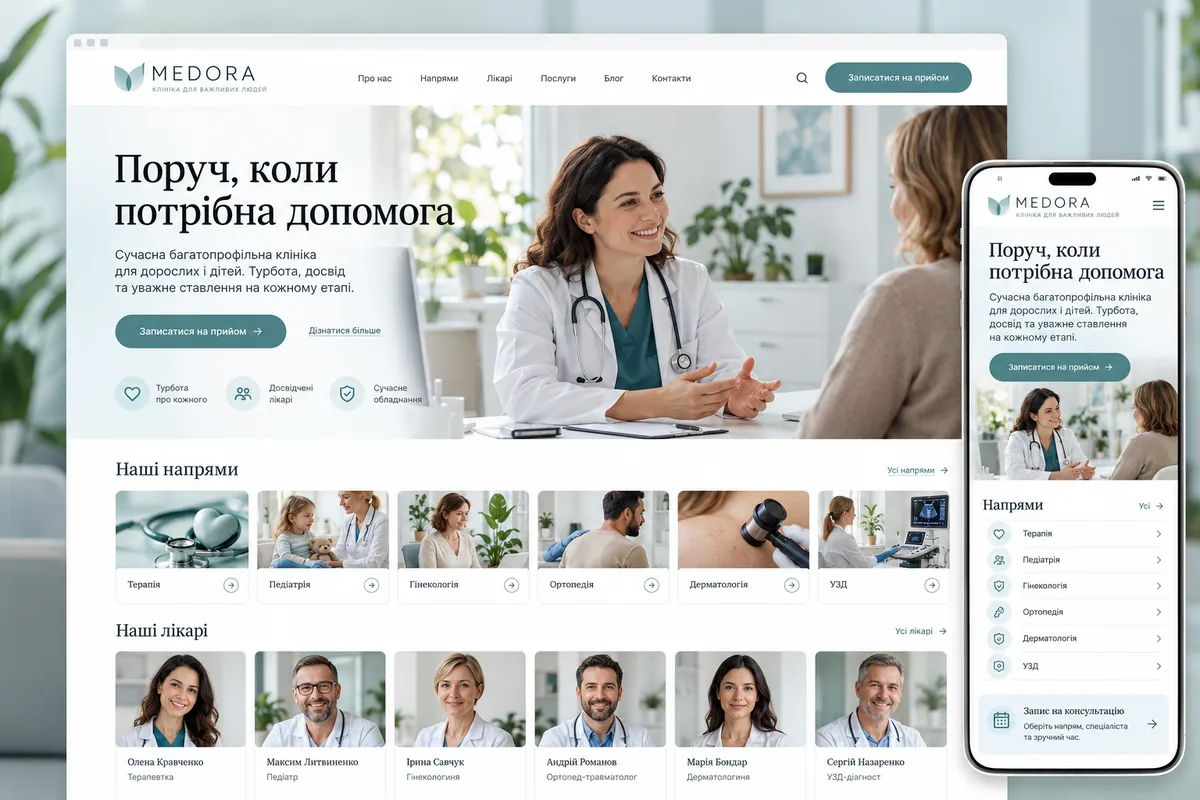
- 01
The doctor is easy to find.
We combine the direction, specialist and place of reception. The patient sees the necessary information to the call and does not confuse the schedule of different branches.
- 02
A clear appointment status
We explain when a person only sends a request, and when the time has already been confirmed. The registry receives contact and the selected direction without unnecessary details.
- 03
Easy to keep up to date
We provide editing of prices, profiles and schedules. We determine the person responsible for medical materials and the procedure for checking changes before publication.
How to start a convenient clinic site
First, we analyze the typical requests of the registry. Some patients are looking for a specific doctor, others are looking for a consultation, examination or the nearest branch. These are different entries to the site that should lead to a single clear result. On the main one we show the main directions and ways of entering; narrow questions are explained on the appropriate pages. The menu with dozens of identical items is replaced by logical groups.
On the phone, readable text, visible contact and short form are important. We do not block information with pop-up windows and do not force to register to see the price. If the clinic has age restrictions or a certain service is available only in one branch, we inform about it next to the record. So the visitor can evaluate the offer before contacting.
What sections are needed for a multidisciplinary clinic
The list of pages is based on actual services. A separate section explains what the clinic offers, the doctor's page introduces the specialist, and the branch page answers organizational questions. Between them we create transitions: from specialty to doctors, from profile to admission and appointment. The information should not contradict itself if the price or schedule changes.
| Page | What information is needed | Next step |
|---|---|---|
| Medical direction | Services, approved explanations and available specialists | Choose a consultation or doctor |
| Doctor's profile | Proven education, specialization, places of admission | Request an appointment |
| A medical service or examination | What the price includes and how appointments work | Clarify availability |
| Branch | Address, hours, entrance, availability and contacts | Get directions or call |
| Prices and rules | Current price, service warehouse, treatment procedure | Compare conditions without guessing |
- HomeDirections and convenient start of search
- SpecialityAvailable services and doctors
- DoctorVerified profile and place of admission
- ServiceTerms and a breakdown of the price
- BranchAddress, schedule and contacts
- RecordRequest or confirmed time
Recording form and schedule integration - different tasks
For the first version, there can be enough forms with a direction, name and contact. After sending, a person sees that the request has been accepted and the time needs to be confirmed by the registry. If you need to choose really free time, we check the capabilities of your medical information system: access to the schedule, updating slots, confirmation, transfer and cancellation. The calendar itself on the page does not solve these processes.
Separately, we work out the refusals: the doctor changed the schedule, the slot was occupied by another patient, the connection was interrupted or the message was not delivered. Re-pressing the button should not create several identical records. The cost of a third-party system, its license and the development of a non-standard connection are indicated in the estimate by separate points so that unexpected payments do not appear after the launch.
How to Show Expertise Without Loud Promises
A convincing site begins with the facts: who works in the clinic, what directions are available, what is included in the consultation and what are the terms of visit. Profiles need up-to-date photos and verified information, not the same text about "the best specialists". Documents and professional statuses are shown only in a consistent and reliable form. Reviews and patient stories should be published according to agreed rules and regulations.
Texts about procedures, training and medical issues are checked by a specialist appointed by the clinic. We fix who is responsible for relevance and how to make changes. The developer does not have to invent indications, treatment results or restrictions on his own. An exact answer to an organizational question is more useful for the patient than a large text with guarantees that the clinic cannot confirm.
What data is needed for the site to record
At the initial stage, a minimum of data is usually sufficient for communication. We do not propose to enter the diagnosis in an open comment and do not convert a simple form into a repository of medical documents. If you need a personal account, results of examinations or file exchange, this is a separate project with certain roles, accesses and protection requirements. Such functions are not automatically added along with the "Register" button.
We do not provide names, telephones, e-mail addresses, text of requests or medical details. We also check page addresses and link parameters: data can get there due to the unsuccessful implementation of the form. The message for the administrator contains only an agreed set of fields; we determine access rights together with the responsible representatives of the clinic.
What determines the development budget
The calculation requires the number of departments, doctors and branches, the state of the materials and the desired recording method. We separate the initial launch and the subsequent development: for example, first a public directory with requests, then a schedule with confirmation. We also set the same rules for the cards and links between pages so that the extension does not require manually reworking each section.
| Component | Compact variant | What increases the scope |
|---|---|---|
| Structure | A few main directions | Many specialties, branches and languages |
| Doctors | Profiles with ready data | Filters, complex graphics and synchronization |
| Record | An appointment request confirmed by an operator | Live schedule and two-way integration |
| Materials | Approved text and photos | Collection of facts, new shooting, medical editing |
| Office | Not required for the first version | Authorization, roles and private documents |
What to check before launch
We go through the main routes on the computer and phone: from the doctor, branch, price and record. Check the messages after sending, delivery of the enquiry, repeated clicks and errors. If there is a schedule, we test the change in availability and the situation when the right time is no longer available. Together with the clinic, we check contacts, prices and names of specialties.
After the technical check, we transfer the order of editing and approval of materials. Coordinated analytics can show the beginning and successful sending of the form without its content. Visiting a page or pressing a number is not an actual reception: this requires correct accounting in the internal system. Further changes are evaluated according to understandable tasks, not only the appearance of the site.
Frequently asked questions
Can we connect our medical information system?
First, check the documentation, available methods of exchange and supplier conditions. Some systems have a ready module, others require separate integration. Agree where the schedule is stored and who confirms the record. We do not promise compatibility with any system before this check.
Does the patient need an account?
To get acquainted with the services and a simple request for admission is not necessary. The Cabinet is justified if there are clear tasks: record management or agreed access to documents. We evaluate its development, protection and further support separately.
Who writes and checks medical texts?
We help with logic, language and presentation, but the actual medical content is agreed by the specialist of the clinic. You need a responsible editor, data sources and update procedure. Texts should not contain independently invented recommendations or guarantees of the result of treatment.
How should several branches be presented?
We create pages of real locations with our own contacts, schedules, doctors and available services. In the record we keep the selected branch. If the doctor works in several places, we show this in one verified profile without creating conflicting copies.
What do I need to convey first?
List of services and doctors, price list, branches, available photos and description of the registry. Specify the name of the accounting system and the desired recording method. Then we will determine the required structure, materials and limits of the first run.
Prepared by the Cartel Digital team. The examples illustrate possible solutions; we agree the scope around your business needs.
Make it easier for patients to find and contact your clinic
Tell us about your specialties, branches and current enrollment process. Let's discuss what the patient needs on the site and what connections the team really needs.