Cars are easy to compare.
The class, gearbox, number of seats, trunk and features are presented equally in all cards. The client can choose the appropriate option without a dozen calls.
MOTION has created a clean car feed: a wide frame of the road, a lot of light and an accurate yellow accent. Search by dates and place of receipt stands next to the main offer. Below is a fleet in which it is easy to compare classes and capacity of cars.
Design Solutions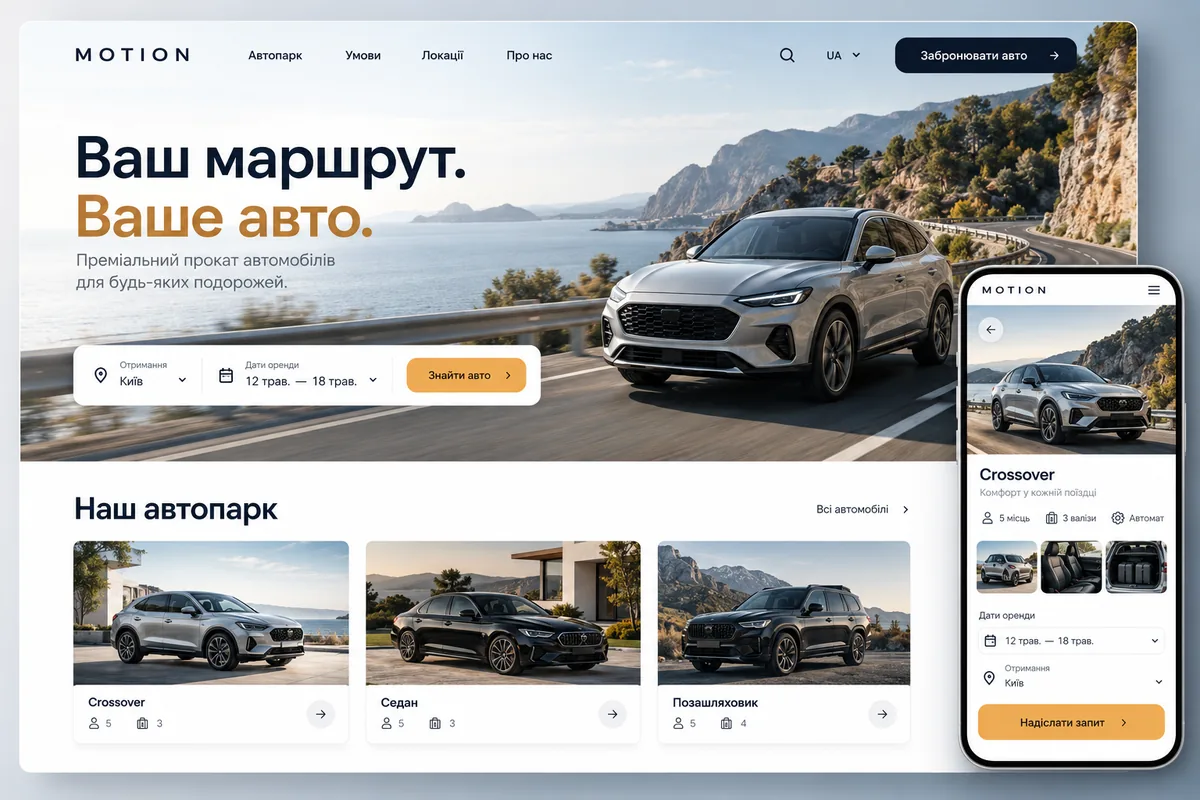
The basis of the structure was the path from the route to a specific car. The card should answer questions about passengers, luggage, gearbox and conditions. At the development stage, it is important to separately agree on the collateral, insurance and how to confirm availability.
Calm catalogue grid balances a large car frame. On the mobile screen, the photo remains distinct, but does not displace the characteristics and the transition to the request.
The class, gearbox, number of seats, trunk and features are presented equally in all cards. The client can choose the appropriate option without a dozen calls.
We show how the rental period, place of receipt and additional services affect the amount. Separately, we explain the collateral and conditions agreed by your company.
If the fleet is conducted manually, the site collects a request and explains the order of confirmation. For automatic booking you need a reliable source of available cars.
Each section has its own role. Open the card to see how the pages continue to get acquainted with the business.
The beginning of the choice and basic conditions
Classes and comparison of characteristics
Photos, rates and availability
Rental rules and additional options
Collection and return
Travel & Confirmation Options
We retain the strong central idea and adapt the structure, content and integrations to your business. The final scope depends on the features needed and the materials available.
Development for your fieldWe agree on the pages, facts, photos and key scenario. We divide the necessary for the first launch and further development.
We transfer the agreed submission to the site: we check the reading, navigation, shapes and display of images on different screens.
We define what your team can edit and where the data comes from. Payments, CRM connections and booking systems are agreed around your business needs.
We go through the main scenario, check the delivery of the enquiry, indexing and analytics. We transfer accesses and the order of updating materials.
Tell us what you liked about MOTION and what your website needs to achieve. We will suggest a design approach and structure, then agree on a quote.
Discuss your project